

Productivity
Quick Message for WhatsApp
Send a WhatsApp message to any phone number from your Windows PC, without saving the contact first.
The Microsoft Store page shows the current price and whether a free trial is offered.
Quick Message for WhatsApp is an independent app. Not affiliated with WhatsApp or Meta. WhatsApp is a trademark of its owner.
About the app
Quick Message for WhatsApp is a Windows app that sends a message to a phone number that is not saved in your contacts. Type or paste the number, write your message and send it, with no need to add the person to your phone first.
There are two ways to send. Use the app window, or select a phone number in any program and press your hotkey: the WhatsApp window opens on that number straight away. Changing a hotkey needs a restart of the app.
The WhatsApp desktop app must be installed on your computer. Available on the Microsoft Store since December 2021.
Features
- No need to save the contactSend a message to any number without adding it to your contacts first.
- Send from the app or a hotkeySelect a number anywhere on your screen, press your hotkey and WhatsApp opens on that number.
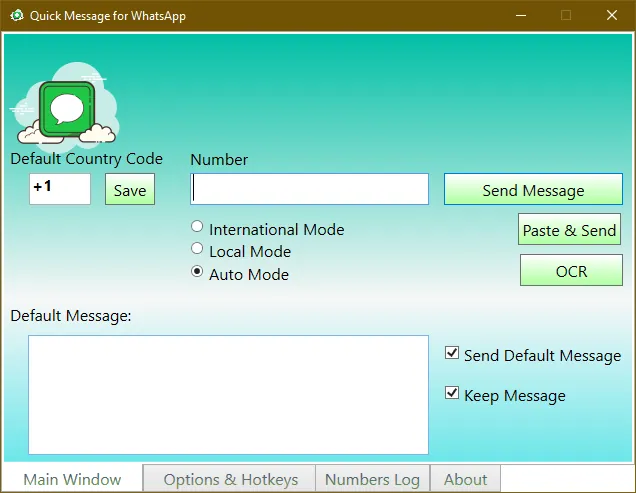
- International, local and auto modesChoose how numbers are read and set a default country code, so local numbers work without typing the code each time.
- Default messageWrite a default message and choose whether to send it automatically and whether to keep it after sending.
- Paste and send, and OCRThe main window has Paste and Send and OCR buttons for faster number entry.
- Your own hotkeys and a numbers logSet the hotkey combination you like in Options and Hotkeys, and review numbers you used in the Numbers Log tab.
Screenshots
The app window on Windows.
Contact
Contact: Business Bay, Dubai, UAE
Email: Enable JavaScript to see our contact details
Mobile: Enable JavaScript to see our contact details